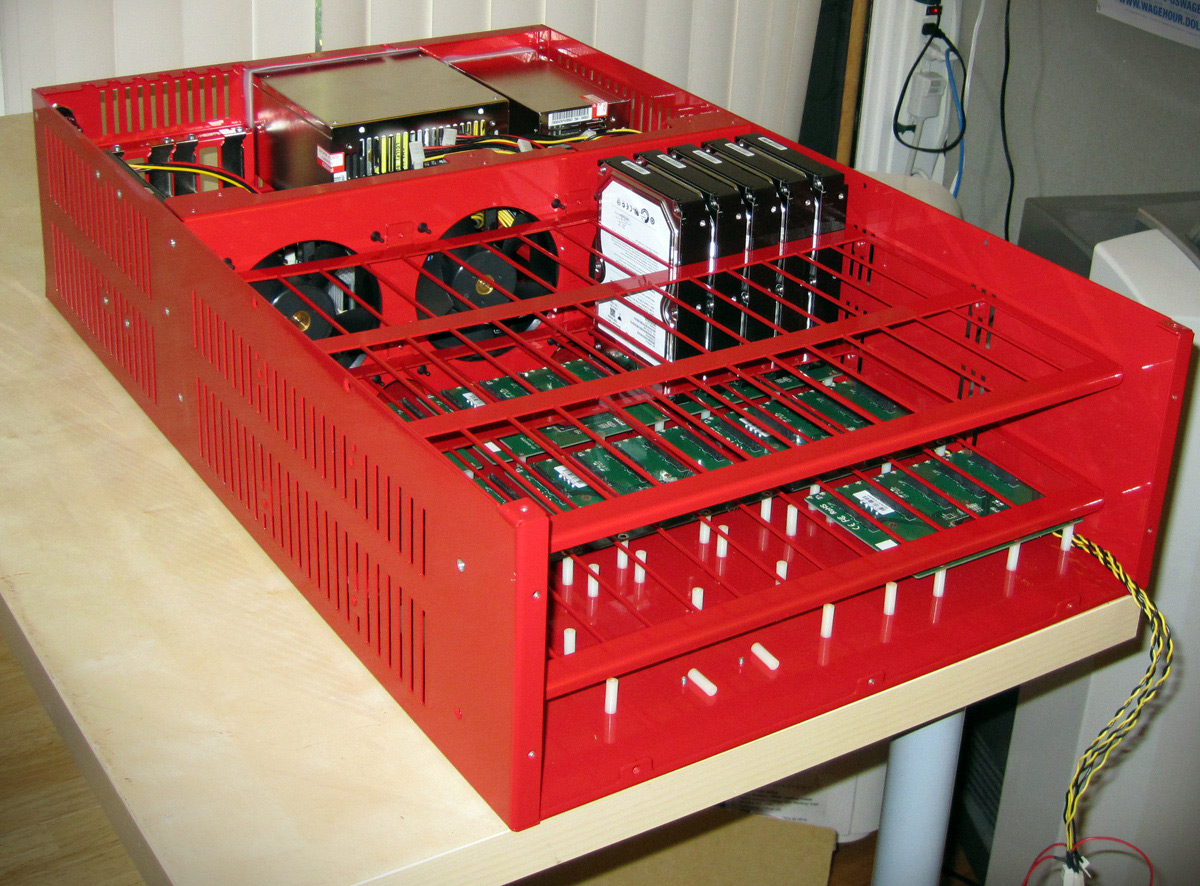
Storage is typically 10% of IT load, but storage can be quite expensive from a cost and power & cooling requirement if you use an EMC or NetApp storage appliance. A change though is the Open Sourced model coming to storage appliances as GigaOm reports.
Are You Ready for Open Source Hardware?
By Om Malik | Tuesday, September 1, 2009 | 6:00 AM PT | 0 comments
 According to the Chaos Theory, in a giant system that lots of interconnections, even the smallest effect can cause a massive impact. It is more simply described by the Butterfly Effect. This theory has taken its toll on the software business, thanks to the rise of the open source software platforms. Today, I learnt about a move made by Backblaze, a small San Francisco-based online back-up service that can cause a similar disruption in the storage industry.
The company, whose primary business is selling online storage to consumers for a small monthly fee today announced that it is giving away the design of its storage cluster for anyone to use, modify and build upon. The design allows anyone to build large storage clusters – from a few terabytes to over a petabytes. What’s so disruptive about this. What if I told you that you could build a petabyte sized cluster for around $120,000.
Now compare that to a couple of million dollars to a storage company like EMC Corp. or a server maker such as Sun Microsystems. The image below actually does a much better job of making a comparison between the Backblaze-solution and other commercial storage options.
 Actually if this works, companies like NetApp and EMC could be in trouble. Just like Linux slowly eroded away the premiums charged by the likes of Sun, these storage giants could see their business get negatively impacted. As the IT world transitions to a cloud-based computing, the need for web-scale storage systems is going to increase. Google, for instance has shown that you can build gigantic storage systems out of commodity parts and smart software.
A more critical view comes from StorageMojo.
Cloud storage for $100 a terabyte
by Robin Harris on Tuesday, 1 September, 2009
Imagine cloud storage that didn’t cost much more than bare drives. High density storage with RAID 6 protection, reasonable bandwidth and web-friendly HTTPS access.
And really, really cheap.
Raw disk cost is only 5-10% of a RAID systems cost. The rest goes for corporate jets, sales commissions, 3 martini lunches, tradeshows, sheetmetal, 2 Intel x86 mobos, obscene profits and a few pale and blinking engineers in a windowless lab who make the whole thing work.
Storage for ascetics
But let’s say you didn’t want the 3 martini lunch or the barely-clad booth babes. All you want is really cheap economical, reasonably reliable storage.
You aren’t running the global financial system – what’s left of it anyway – and you don’t have a 2500 person call center hammering on a few dozen Oracle databases 7 x 24. No, you’re thinking a quiet cloud storage business for SMB’s, maybe backup and some light file sharing, that will give you a nifty little revenue stream with annual renewals so you can see trouble coming 12 months in advance.
Enough redundancy so when something breaks you can wait until morning to fix it instead of an 0300 pajama run to the data center. Easy connectivity so you aren’t blowing the savings on Cisco switches.
Part of being open is the backblaze blog entry.
What Makes a Backblaze Storage Pod
A Backblaze Storage Pod is a self-contained unit that puts storage online. It’s made up of a custom metal case with commodity hardware inside. Specifically, one pod contains one Intel Motherboard with four SATA cards plugged into it. The nine SATA cables run from the cards to nine port multiplier backplanes that each have five hard drives plugged directly into them (45 hard drives in total).
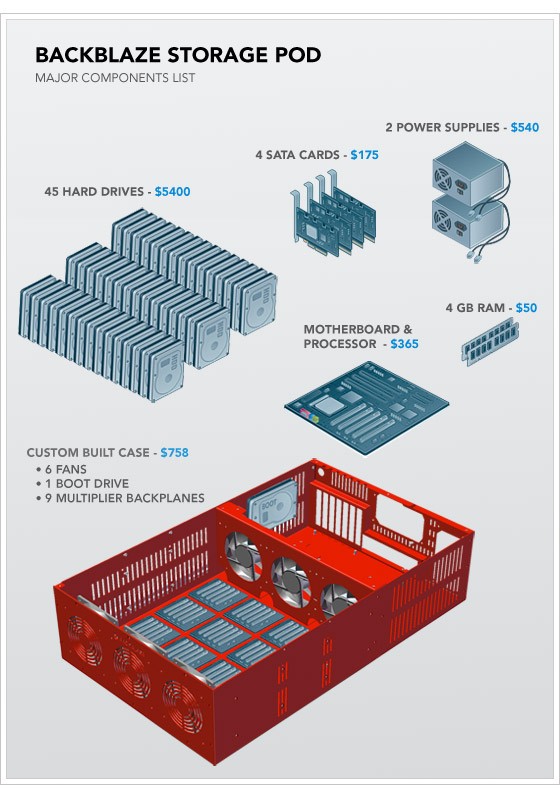
Above is an exploded diagram, and you can see a detailed parts list in Appendix A at the bottom of this post. The two most important factors to note are that the cost of the hard drives dominates the price of the overall pod and that the rest of the system is made entirely of commodity parts.
Wiring It Up: How to Assemble a Backblaze Storage Pod
The power wiring diagram of a Backblaze Storage Pod is seen below. Power supply units (PSUs) provide most of their power on two different voltages: 5V and 12V. We use two power supplies in the pod because 45 drives draw a lot of 5V power, yet high wattage ATX PSUs provide most of their power on 12V. This is not an accident: 1,500 watt and larger ATX power supplies are designed for powerful 3-D graphics cards that need the extra power on the 12V rail. We could have switched to a power supply designed for servers, but two ATX PSUs are cheaper.
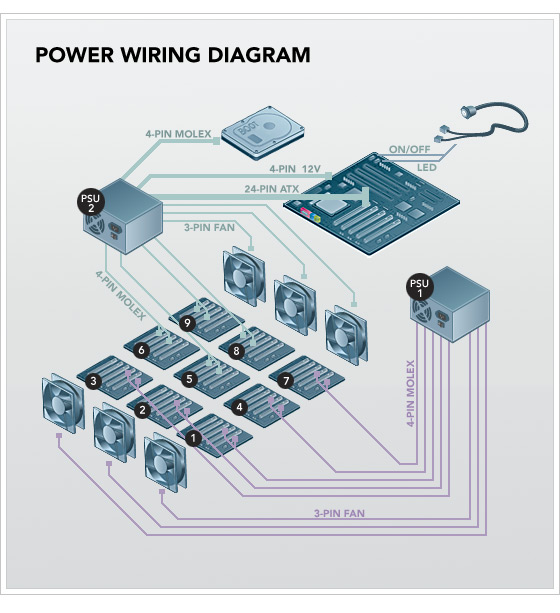
PSU1 powers the front three fans and port multiplier backplanes 1,2,3,4, and 7. PSU2 powers everything else. (See Appendix A for a detailed list of the custom connectors on each PSU.) To power the port multiplier backplanes, the power cables run from the PSUs through four holes in the divider metal plate that holds the fans at the center of the case (near the base of the fans) and then continue to the underside of the nine backplanes. Each port multiplier backplane has two molex male connectors on the underside. Hard drives draw the most power during initial spin-up, so if you power up both PSUs at the same time, it can draw a large (14 amp) spike of 120V power from the socket. We recommend powering up PSU1 first, waiting until the drives are spun-up (and the power draw decreases to a reasonable level), and then powering up PSU2. Fully booted, the entire pod will draw approximately 4.8 amps idle and up to 5.6 amps under heavy load.
Below is a picture of a partially assembled Backblaze Storage Pod (click on the photo for a larger image). The metal case has screws mounted on the bottom, facing upward, where we attach nylon standoffs (the small white pieces in the picture below). Nylon helps dampen vibration, and this dampening is a critical aspect of server design. The circuit boards shown on top of the nylon standoffs are a few of the nine SATA port multiplier backplanes that take a single SATA connection on their underside and allow five hard drives to be mounted vertically and plugged into the topside of the board. All the power and SATA cables run underneath the port multiplier backplanes. One of the backplanes in the picture below is fully populated with hard drives to show the positioning.
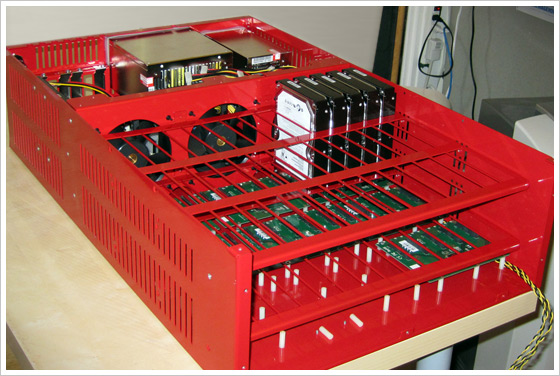
A note about drive vibration: The drives vibrate too much if you leave them sitting as shown in the picture above, so we add an “anti-vibration sleeve” (essentially a rubber band) around the hard drive in between the red metal grid and the drives. This seats the drives tightly in the rubber. We also lay a large (16″ x 17″ x 1/8″) piece of foam along top of the hard drives after all 45 are in the case. The lid then screws down on top of the foam to hold the drives securely. In the future, we will dedicate an entire blog post to vibration.
The SATA wiring diagram is seen below.
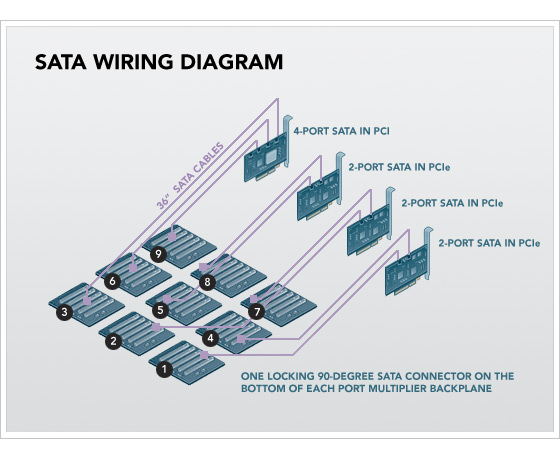
The Intel Motherboard has four SATA cards plugged into it: three SYBA two-port SATA cards and one Addonics four-port card. The nine SATA cables connect to the top of the SATA cards and run in tandem with the power cables. All nine SATA cables measure 36 inches and use locking 90-degree connectors on the backplane end and non-locking straight connectors into the SATA cards.
A note about SATA chipsets: Each of the port multiplier backplanes has a Silicon Image SiI3726 chip so that five drives can be attached to one SATA port. Each of the SYBA two-port PCIe SATA cards has a Silicon Image SiI3132, and the four-port PCI Addonics card has a Silicon Image SiI3124 chip. We use only three of the four available ports on the Addonics card because we have only nine backplanes. We don’t use the SATA ports on the motherboard because, despite Intel’s claims of port multiplier support in their ICH10 south bridge, we noticed strange results in our performance tests. Silicon Image pioneered port multiplier technology, and their chips work best together.
And the software stack.
A Backblaze Storage Pod Runs Free Software
A Backblaze Storage Pod isn’t a complete building block until it boots and is on the network. The pods boot 64-bit Debian 4 Linux and the JFS file system, and they are self-contained appliances, where all access to and from the pods is through HTTPS. Below is a layer cake diagram.
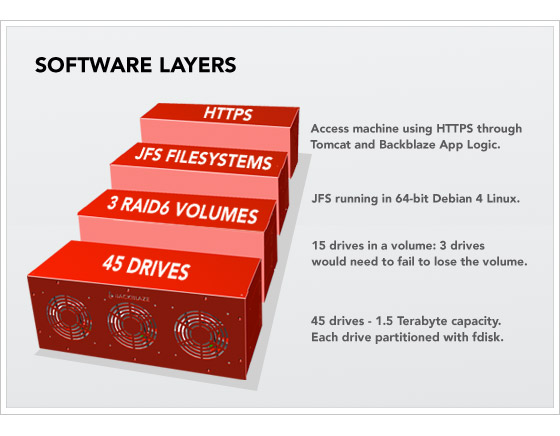
Starting at the bottom, there are 45 hard drives exposed through the SATA controllers. We then use the fdisk tool on Linux to create one partition per drive. On top of that, we cluster 15 hard drives into a single RAID6 volume with two parity drives (out of the 15). The RAID6 is created with the mdadm utility. On top of that is the JFS file system, and the only access we then allow to this totally self-contained storage building block is through HTTPS running custom Backblaze application layer logic in Apache Tomcat 5.5. After taking all this into account, the formatted (useable) space is 87 percent of the raw hard drive totals. One of the most important concepts here is that to store or retrieve data with a Backblaze Storage Pod, it is always through HTTPS. There is no iSCSI, no NFS, no SQL, no Fibre Channel. None of those technologies scales as cheaply, reliably, goes as big, nor can be managed as easily as stand-alone pods with their own IP address waiting for requests on HTTPS.


 Energy consumption is one of the leading drivers of operating expenses for both fixed and mobile network operators. Reliable access to electricity is limited in many developing countries that are currently the high-growth markets for telecommunications. At the same time, many operators have adopted corporate social responsibility initiatives with a goal of reducing their networks’ carbon footprints, and network infrastructure vendors are striving to gain competitive advantage by reducing the power requirements of their equipment. All of these factors will continue to converge over the next several years, creating significant market potential for greener telecom networks.