Early indicator of Google Data Center growth? $400 SE Asia Japan cable project

Guardian UK reports.on the announcement.

Google backs world's fastest internet cable

• Undersea line set to run 5,000 miles across southeast Asia
• £245m cable marks latest investment in net infrastructure

In little more than a decade, Google has conquered the technology industry and become one of the world's most powerful companies. Its latest undertaking, however, may be one of its most ambitious: a giant undersea cable that will significantly speed up internet access around the globe.

The Californian search engine is part of a consortium that confirmed its plans to install the new Southeast Asia Japan Cable (SJC) yesterday, the centrepiece of a $400m (£245m) project that will create the highest capacity system ever built.

Gigaom references the 2008 SJC proposal.

Google’s Underwater Ambitions Expand

By Stacey Higginbotham December 11, 2009 1 Comment

0 45

The original SJC proposal

Read more

Amazon Web Services adds global physical data shipping and receiving to cloud computing services

Amazon is setting the standard for cloud computing services.  AWS just announced a beta import/export service to allow 2TB of data to be imported or exported globally from AWS S3.

AWS Import/Export Goes Global

AWS Import/Export is a fast and reliable alternative to sending large volumes of data across the internet. You can send us a blank storage device and we'll copy the contents of one or more Amazon S3 buckets to it before shipping it back to you. Or, you can send us a storage device full of data and we'll copy it to the S3 buckets of your choice.

Until now, this service was limited to US shipping addresses and to S3's US Standard Region. We've lifted both of those restrictions; developers the world over now have access to AWS Import/Export. Here's what's new:

  • Storage devices can now be shipped to an AWS address in the EU for use with S3's EU (Ireland) Region.At this time, devices shipped to our AWS locations in the EU most originate from and be returned to an address within the European Union.
  • Storage devices can be shipped from almost anywhere in the world to a specified AWS address in the US for data loads into and out of buckets in the US Standard Region. Previously, devices could only be shipped from and returned to addresses in the United States.

What would use this for? 

Common Uses for AWS Import/Export

AWS Import/Export makes it easy to quickly transfer large amounts of data into and out of the AWS cloud. You can use AWS Import/Export for:

  • Data Migration – If you have data you need to upload into the AWS cloud for the first time, AWSImport/Export is often much faster than transferring that data via the Internet.
  • Offsite Backup – Send full or incremental backups to Amazon S3 for reliable and redundant offsite storage.
  • Direct Data Interchange – If you regularly receive content on portable storage devices from your business associates, you can have them send it directly to AWS for import into your Amazon S3 buckets.
  • Disaster Recovery – In the event you need to quickly retrieve a large backup stored in Amazon S3, use AWSImport/Export to transfer the data to a portable storage device and deliver it to your site.

When should you consider this service?  AWS answers this as well.

When to Use AWS Import/Export

If you have large amounts of data to load and an Internet connection with limited bandwidth, the time required to prepare and ship a portable storage device to AWS can be a small percentage of the time it would take to transfer your data over the internet. If loading your data over the Internet would take a week or more, you should consider using AWS Import/Export.

Below is a table that gives guidance around common internet connection speeds on: (1) how long it will take to transfer 1TB of data over the Internet into AWS (see the middle column for this estimate); and, (2) what volume of total data will require a week to transfer over the Internet into AWS, and therefore warrant consideration of AWSImport/Export (see the right-hand column). For example, if you have a 10Mbps connection and expect to utilize 80% of your network capacity for the data transfer, transferring 1TB of data over the Internet to AWS will take 13 days. The volume at which this same set-up will take at least a week, is 600GB, so if you have 600GB of data or more to transfer, and you want it to take less than a week to get into AWS, we recommend you using AWSImport/Export.

Available Internet Connection
Theoretical Min. Number of Days to Transfer 1TB at 80% Network Utilization
When to Consider AWSImport/Export?

T1 (1.544Mbps)
82 days
100GB or more

10Mbps
13 days
600GB or more

T3 (44.736Mbps)
3 days
2TB or more

100Mbps
1 to 2 days
5TB or more

1000Mbps
Less than 1 day
60TB or more

If anyone can efficiently receive and ship items it is amazon, and it was smart they added this capability to AWS.  We’ll see how long before other cloud computing providers add this service.  My bet is you’ll have to wait a while as few would have thought to set up shipping and receiving in their cloud computing internal network.

Read more

Container Data Center form a silo cylinder or shipping container box

Clumeq has a new super computer repurposing their decommissioned Van de Graff particle accelerator.

The Quebec site is on the campus of Université Laval inside a renovated van de Graaf silo, with an innovative cylindrical layout for the data center. This cluster will feature upwards of 12,000 processing elements. Compute racks will be distributed among three floors of concentrical rings with a total surface area of 2,700 sq.ft. with an IT capacity of approximately 600 kW.

DataCenterKnowledge picked up the news.

Wild New Design: Data Center in A Silo

December 10th, 2009 : Rich Miller

clumeq-design-470

A diagram of the design of the CLUMEQ Colossus supercomputer, from a recent presentation by Marc Parizeau of CLUMEQ.

Here’s one of the most unusual data center designs we’ve seen. The CLUMEQsupercomputing center in Quebec has worked with Sun Microsystems to transform a huge silo into a data center. The cylindrical silo, which is 65 feet high and 36 feet wide with two-foot thick concrete walls, previously housed a Van de Graaf particle accelerator. When the accelerator was decommissioned, CLUMEQ decided to convert the facility into a high-performance computing (HPC) cluster known as Colossus.

Here is the youtube video.

This idea may seem strange, but it is part of connecting the building to IT equipment.  Microsoft just did this showing their Windows Azure Containers with the cooling system integrated in the container.

L1020981

Sun has their own page on Clumeq.

When supercomputing consortium CLUMEQ designed its high-performance computing (HPC) system in Quebec, it was able to house it in the silo of a former particle accelerator on the Université Laval campus. The structure's 3-level cylindrical floor plan was ideal for cooling the 56 standard-size racks, and enabled the university to retain a treasured landmark.

Background

CLUMEQ is a supercomputing consortium of universities in the province of Quebec, Canada. It includes McGill University, Université Laval, and all nine components of the Université du Québec network. CLUMEQ supports scientific research in disciplines such as climate and ecosystems modeling, high energy particle physics, cosmology, nanomaterials, supramolecular modeling, bioinformatics, biophotonics, fluid dynamics, data mining and intelligent systems.

Read more

Christian Belady’s history of PUE

Christian Belady has a post on the Inflection Point for Efficiency in the data center which provides an early history of PUE as a data center metric.

In my opinion, it wasn’t until 2006 that the industry really did go through a paradigm shift. While there were a few of us who had been pushing efficient computing approaches for over a decade), we had limited success in moving the industry until 2006. What happened in 2006? I think the notion of establishing an industry efficiency metric and data center metrics were born. I thought it would be interesting to recap those milestones based on my perspective:

Christian provides three milestones you can read in his post.  Here is the third milestone.

April 23-26, 2006: High-Density Computing: Trends, Challenges, Benefits, Costs, and Solutions

This symposium was the Uptime Institute’s first and it focused on Density trends. However, it was this conference where I first presented an Efficiency Metric called PUE which seemed to capture the attention of many of the attendees. As a result, I published a paper on PUE with my good friend Chris Malone later in the year at the Digital Power Forum. At this same conference, AMD’s Larry Vertal and Bruce Shaw sat down with Paul Perez (my former VP) and I to discuss the idea of starting a consortium called the Green Grid. Ten months later the Green Grid was officially announced with one of its first whitepapers evangelizing metrics and in particular PUE.

and Christian, takes times to reflect.

So our industry woke up in 2006 and while the Gartner graph does show we have work ahead of us, I do think we can say that in less than four years the industry has made great strides (and perhaps I shouldn’t complain so much!).

What we need from Christian is Part 3 on what his prediction of the future is as he is already proven to make history.

He did do this in 1998 and ten years later. /2008/03/christian-belad.html

Mar 27, 2008

Christian Belady's Bottom Line Opinion 10 years ago, We Need A Better System

Microsoft's Christian Belady was going through his old presentations and found a public presentation on The Big Picture, A Philosophical Discussion to Make US Think. Download Cbelady.pdf The presentation is an accumulation of predictions he was making in the late '90s as part of making a case for more efficient computing while at HP.

Summary
Power is not just a….
•component problem
•System problem
•Data center problem
•Utility Infrastructure problem
We have a huge opportunity to solve these problems as one system and optimize the solution.
WE NEED A BETTER SYSTEM!

Big Picture
Bottom Line
We need to cooperate to solve these problems on a much larger scale.
Develop consortiums to address these global issues and influence the industry, government and culture proactively.
We need to ensure that we have a better world.

Read more

Amazon Web Services Economics Center, comparing AWS/cloud computing vs co-location vs owned data center

Amazon Web Services has a post on the Economics of AWS.

The Economics of AWS

For the past several years, many people have claimed that cloud computing can reduce a company's costs, improve cash flow, reduce risks, and maximize revenue opportunities. Until now, prospective customers have had to do a lot of leg work to compare the costs of a flexible solution based on cloud computing to a more traditional static model. Doing a genuine "apples to apples" comparison turns out to be complex — it is easy to neglect internal costs which are hidden away as "overhead".

We want to make sure that anyone evaluating the economics of AWS has the tools and information needed to do an accurate and thorough job. To that end, today we released a pair of white papers and an Amazon EC2 Cost Comparison Calculator spreadsheet as part of our brand new AWS Economics Center. This center will contain the resources that developers and financial decision makers need in order to make an informed choice. We have had many in-depth conversations with CIO's, IT Directors, and other IT staff, and most of them have told us that their infrastructure costs are structured in a unique way and difficult to understand. Performing a truly accurate analysis will still require deep, thoughtful analysis of an enterprise's costs, but we hope that the resources and tools below will provide a good springboard for that investigation.

The AWS team has laid out the costs of AWS Cloud vs. owned IT infrastructure.


Whitepaper
The Economics of the AWS Cloud vs. Owned IT Infrastructure. This paper identifies the direct and indirect costs of running a data center. Direct costs include the level of asset utilization, hardware costs, power efficiency, redundancy overhead, security, supply chain management, and personnel. Indirect factors include the opportunity cost of building and running high-availability infrastructure instead of focusing on core businesses, achieving high reliability, and access to capital needed to build, extend, and replace IT infrastructure.

If you have every wished for a spreadsheet to help you calculate data center costs, AWS has this.


Ec2costcalcThe Amazon EC2 Cost Comparison Calculator is a rich Excel spreadsheet that serves as a starting point for your own analysis. Designed to allow for detailed, fact-based comparison of the relative costs of hosting on Amazon EC2, hosting on dedicated in-house hardware, or hosting at a co-location facility, this detailed spreadsheet will help you to identify the major costs associated with each option. We've supplied the spreadsheet because we suspect many of our customers will want to customize the tool for their own use and the unique aspects of their own business.

And, they launched an Economics Center.

AWS Economics Center

The AWS Economics Center provides access to information, tools, and resources to compare the costs of Amazon Web Services with IT infrastructure alternatives. Our goal is to help developers and business leaders quantify the economic benefits (and costs) of cloud computing.

Overview

Amazon Web Services (AWS) gives your business access to compute, storage, database, and other in-the-cloud IT infrastructure services on demand, charging you only for the resources you actually use. With AWS you can reduce costs, improve cash flow, minimize business risks, and maximize revenue opportunities for your business.

  • Reduce costs and improve cash flow.
    Avoid the capital expense of owning servers or operating data centers by using AWS’s reliable, scalable, and elastic infrastructure platform. AWSallows you to add or remove resources as needed based on the real-time demands of your applications. You can lower IT operating costs and improve your cash flow by avoiding the upfront costs of building infrastructure and paying only for those resources you actually use.
  • Minimize your financial and business risks.
    Simplify capacity planning and minimize both the financial risk of owning too many servers and the business risk of not owning enough servers by usingAWS’s elastic, on-demand cloud infrastructure. SinceAWS is available without contracts or long-term commitments and supports multiple programming languages and operating systems, you retain maximum flexibility. And for many businesses, the security and reliability of the AWS platform often exceeds what they could develop affordably on their own.
  • Maximize your revenue opportunities.
    Maximize your revenue opportunities with AWS by allocating more of your time and resources to activities that differentiate your business to your customers – instead of focusing on IT infrastructure “heavy lifting.” Use AWS to provision IT resources on-demand within minutes so your business’s applications launch in days instead of months. UseAWS as a low-cost test environment to sample new business models, execute one-time projects, or perform experiments aimed at new revenue opportunities.

Capacity vs. Usage Comparison
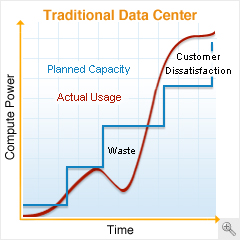
This last graph is the Christmas wish list for enlightened green IT thinkers.  IT load that tracks to demand.

Read more