Side Benefit of Monitoring Obsession, Guaranteed to Pass Auto Emissions Test

I just got back from Data Centre Dynamics London, and I have tons of posts and observations from the conference I need to write up.  One of the things I figured out watching OSIsoft’s Martin Otterson and Iberdola’s Miguel Chavero present on

Command & Control
Connecting the Dots in Data Centre Automation (DCA): Controlling the building and integrating IT systems
Martin Otterson - OSIsoft
Miguel Chavero – Iberdrola

is few people are driven almost to an obsession to monitor systems. As all of you know monitoring a data center is no easy task.  Even though the group of people came to the session to hear Martin and Miguel discuss data center monitoring it was amazing how few people had monitoring in place.  I think I am hanging out with too many people who take for granted using PUE as one of their tools to measure data center efficiency.

One guy who stuck around to ask questions was from http://www.syska.com/, but otherwise it seemed like users want the monitoring, but it is too hard to add instrumentation/monitoring after the fact.  Could you imagine how hard it would be to add the equivalent of the Prius hybrid monitoring system after the fact.  Isn’t it more cost effective to have monitoring built in as part of construction?  Of course yes.  This is what Google and Microsoft do, but why don’t others make monitoring part of their RFP?

I had previously mentioned the auto monitoring device scan gauge in a post, and decided to buy one as neither of my cars have a MPG gauge.  After 3 weeks of using the device it gave me better information about my cars that typically only the mechanics get to.

I needed to take my car into local Washington State Emissions test site for an emissions test.  I was standing in the safety area waiting, and the technician was taking a long time, then I realized he was having a hard time finding the OBD connector.

On-Board Diagnostics, or OBD, in an automotive context, is a generic term referring to a vehicle's self-diagnostic and reporting capability. OBD systems give the vehicle owner or a repair technician access to state of health information for various vehicle sub-systems. The amount of diagnostic information available via OBD has varied widely since the introduction in the early 1980s of on-board vehicle computers, which made OBD possible. Early instances of OBD would simply illuminate a malfunction indicator light, or MIL, if a problem was detected—but would not provide any information as to the nature of the problem. Modern OBD implementations use a standardized fast digital communications port to provide realtime data in addition to a standardized series of diagnostic trouble codes, or DTCs, which allow one to rapidly identify and remedy malfunctions within the vehicle.

I told him he needed to unplug the scan gauge and then he could plug in his test equipment.  He asked what it was and what it did.  He said, “it’s too bad more people don’t have devices like this.” He’s seen people drive for 18 months with engine codes blinking and they don’t get their car fixed as they don’t know what the blinking light means, and their car will have a higher probability of failing the emissions test. At the end of the test, he continues “you pass of course, as you know everything is working.”

I used a similar device to figure out the evaporative fuel system had caused the check engine light to go on in my wife’s car.  Talked to our car mechanic, and he suggested trying to tighten the fuel cap.  Ridiculously simple to fix with the right tool.

Just like a car has built in instrumentation, data centers need to have built in instrumentation.  Slowly more and more people are starting to get this, and the good thing is some of my friends are getting permissions from customers to tell their stories.

Read more

A More Efficient Monitoring Method – Hints

Part of what I look for in my research on green data center is techniques that are lasting and have big impacts.

Monitoring systems are complex and many times not effective, but a necessary evil. Why are these systems so hard to use? The aha moment is Monitoring systems have not embraced the fundamental idea of hints in computer systems.

It started reading James Hamilton’s post on Butler Lampson. Curious, I found Butler Lampson’s paper on hints. The paper was written in July 1983.  And, here is the part that got my attention.

Use hints to speed up normal execution. A hint, like a cache entry, is the saved result of some computation. It is different in two ways: it may be wrong, and it is not necessarily reached by an associative lookup. Because a hint may be wrong, there must be a way to check its correctness before taking any unrecoverable action. It is checked against the ‘truth’, information that must be correct but can be optimized for this purpose rather than for efficient execution. Like a cache entry, the purpose of a hint is to make the system run faster. Usually this means that it must be correct nearly all the time.

This all makes sense for how Monitoring Systems should be designed.

  1. Monitoring should speed up execution of changes.
  2. Speed is traded for accuracy, and monitoring data must have a way to check correctness, because a hint can be wrong.  But, any monitoring data could be wrong, yet who designs in monitoring redundancy?
  3. Monitoring data that must be correct is optimized for its purpose vs. efficient execution.

What is a bit confusing is the paper itself is about hints, and the most useful hint was to use hints.

Hints for Computer System Design[1]

Butler W. Lampson

Computer Science Laboratory
Xerox Palo Alto Research Center
Palo Alto, CA 94304

Abstract

Studying the design and implementation of a number of computer has led to some general hints for system design. They are described here and illustrated by many examples, ranging from hardware such as the Alto and the Dorado to application programs such as Bravo and Star.

1. Introduction

Designing a computer system is very different from designing an algorithm:

The external interface (that is, the requirement) is less precisely defined, more complex, and more subject to change.

The system has much more internal structure, and hence many internal interfaces.

The measure of success is much less clear.

The designer usually finds himself floundering in a sea of possibilities, unclear about how one choice will limit his freedom to make other choices, or affect the size and performance of the entire system. There probably isn’t a ‘best’ way to build the system, or even any major part of it; much more important is to avoid choosing a terrible way, and to have clear division of responsibilities among the parts.

I have designed and built a number of computer systems, some that worked and some that didn’t. I have also used and studied many other systems, both successful and unsuccessful. From this experience come some general hints for designing successful systems. I claim no originality for them; most are part of the folk wisdom of experienced designers. Nonetheless, even the expert often forgets, and after the second system [6] comes the fourth one.


[1] This paper was originally presented at the. 9th acm Symposium on Operating Systems Principles and appeared in Operating Systems Review 15, 5, Oct. 1983, p 33-48. The present version is slightly revised.

I can have a lot of fun with this topic.  And, I’ll start working on a paper using this method after I have researched it further.

Read more

TPC Performance per Watt & Virtualization

SearchDataCenter.com has a post on TPC’s efforts to introduce benchmarks for energy consumption (performance per watt) and virtualization.

TPC eyes energy consumption and virtualization benchmarks

By Bridget Botelho, News Writer
06 Nov 2008 | SearchDataCenter.com

Last month, the San Francisco-based nonprofit Transaction Processing Performance Council (TPC) marked its 20-year anniversary by offering vendor-neutral processing performance benchmarks, disclosing plans for future benchmarks and offering a workshop for end users along the

Currently, the TPC's four active benchmarks are TPC-C and TPC-E for online transaction processing, TPC-H for decision support for ad hoc queries and TPC-App for business-to-business transactional Web services.

And now, in an effort to keep pace with data center initiatives to improve energy consumption and to green IT, TPC plans to offer benchmarks that include energy consumption metrics.

"TPC is currently working on a specification for how to measure and report energy consumption within existing TPC performance benchmarks," said Mike Molloy TPC's chairman. "TPC-Energy will measure the total energy to complete a certain amount of computational work. It will also allow users to measure the power consumed when systems are idle."

TPC discusses how their benchmark will be better than VMmark.

Benchmarking in a virtual world
Future TPC benchmarks will also include guidelines for measuring workloads in virtual environments. TPC hopes to devise a measure of virtual server performance in the same way physical servers are measured.

"There is no reason these benchmarks can't be run in a virtualized environment, and most of our benchmarks will include guidelines on how to measure workloads in virtual environments in the next updates," Molloy said. "With virtual servers, you can have more than one on a physical server, so reporting the performance for all the virtual servers on a physical server is where the rules must be defined."

To date, however only virtualization provider VMware Inc. offers a virtualization benchmarking system, which is called VMmark. The TPC's benchmarking system will be more flexible than VMmark, according to Molloy.

"VMmark requires a fixed set of applications and guest OS to be run (called a Tile). That configuration is not allowed to be changed. We would allow different combinations and a number of applications/Guest OS," Molloy said.

Read more

Sun’s Dean Nelson, Applauds Microsoft and Google’s Sharing Data Center Information

I had a chance to interview Sun’s Dean Nelson. Before I could even ask a question Dean started out applauding Microsoft and Google’s efforts to share data center information. Dean continued on that these efforts drive energy efficiency and transparency of what works and what doesn’t.

Given Microsoft and Google’s market presence they are driving awareness and demand for more information.  And, I think Sun is one of the benefactors which is why Dean is becoming a data center star, focusing on opening the data center industry to share #’s.

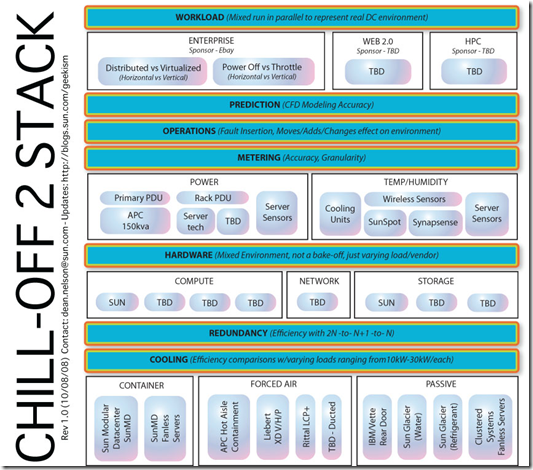
A specific example of Sun’s efforts are the Chill-off where Sun partnered with Silicon Valley Leadership Group and Lawrence Berkeley Labs. This PDF has more info.

image


Other areas where Dean is working on is www.datacenterpulse.com

Data Center Pulse is an exclusive group of global datacenter owners, operators and users.  The goal of this community is to track the pulse of the industry and influence the future of the datacenter through discussion and debate.

And, OpenEco.org

OpenEco.org is a global on-line community that provides free, easy-to-use tools to help participants assess, track, and compare energy performance, share proven best practices to reduce greenhouse gas (GHG) emissions, and encourage sustainable innovation.

image

One of the other areas Dean and I discussed is the inefficiencies of dev, test, pre-production labs.   Here is list of why these labs are inefficient

  1. Few labs are shared resources across a company, as most are dedicated to specific teams who have accumulate the space and equipment.
  2. Most of these labs are in office space and have a PUE in 2.5 – 3.0 range, but no one really knows as the HVAC and power systems are part of the overall office space. (Note: as a piece of trivia I was talking to EPA’s Andrew Fanara and he said part of what got the EPA/Energy Star group interested in energy efficient servers & Data Centers is when the EPA would try to categorize power consumption for buildings, but the exception where those buildings that had data centers in them. Those buildings had power usages that made it difficult to quantify what was an energy efficient building.)
  3. Most labs get the leftover equipment, almost no one puts state of the art equipment in their labs. The exception are a vendor’s demo labs, but these are few.
  4. The number of unused servers that should be decommissioned is just as bad as production environments.  When Sun consolidated its lab space it found 15% of the servers were not being used, but left on from past projects.
  5. Resource usage is extremely cyclical. What happens to all that equipment, when the product ships and the team takes a vacation.  Does anyone turn off the lab?
  6. Limited lab budgets force lab staff to make due with what they have.  Their focus is just get it working.  Production issues are to be looked at later.
  7. No energy monitoring of lab space.  This is changing, and I am having fun working with a few companies who are putting systems together, but it is still in the early days.

You add all this up, and one of the most wasteful areas that has the potential largest ROI percentage are these labs. Virtualization has a high % of adoption in lab environmetns, and is an ideal place to start using Cloud Computing Utility type of paradigms.  IBM has their offering in Rational Test Lab Manager, so you can look for more vendors to do the same.

It as quick conversation, but hopefully the first of many.

I do agree with Dean that Microsoft and Google are making the industry better for all us, except those people who think Microsoft and Google are the enemy.

Read more

Load Testing From The Cloud, A Killer App?

There are debates over the usefulness of cloud' computing for enterprise.  Amazon Web Services blog has a post on how one company is using AWS to create load testing to test other web sites.

SOASTA - Load Testing From the Cloud

I met Tom Lounibos, CEO of SOASTA, at the Palo Alto stop of the AWS Start-Up Tour. Tom gave the audience a good introduction to theirCloudTest product, an on demand load testing solution which resides on and runs from Amazon EC2.

Soasta_recordTom wrote to me last week to tell me that they are now able to simulate over 500,000 users hitting a single web application. Testing at this level gives system architects the power to verify the scalability of sites, servers, applications, and networks in advance of a genuine surge in traffic.

Here are a few of their most recent success stories:

  • Hallmark tested their e-card sites in preparation for the holiday season, and are ramping up testing to over 200,000 simultaneous users using CloudTest.
  • Marvel Entertainment is doing extensive cloud testing in order to get ready for the release of the sequel to IronMan.
  • A division of Procter & Gamble is using cloud testing to get ready for new releases of their web site.

Soasta also has a monitoring capability.

See Across Your Entire Web Application Infrastructure.

Resource Monitoring

Monitoring is the ability to monitor a resource (hardware, network, load balancer, firewall, Web server, database, application server, content management system, etc.) and capture usage information about that resource. Resource monitoring is a key component of professional Web testing. While it is crucial that a Web application functions correctly, resource usage and end-to-end response are extremely important. When there are problems, you need information about resource usage across the entire infrastructure of your Web application.

Resource information can be captured from any available resource in the Web application infrastructure—not just the Web server hosting the Web application. SOASTA CloudTest can monitor all three tiers of your Web application—the Web server, the application server, and the database server. It can also capture valuable information about other components in your network architecture—load balancers, for example.

Soasta says load testing is the killer app for cloud computing.  Didn’t think about it until now, but makes a lot of sense.

"Load and performance testing is the ‘killer application’ for cloud computing," said Tom Lounibos, CEO of SOASTA. "Companies can very easily create a real-world test environment without having to invest in it. Developers have virtually unlimited and affordable access to thousands of servers, memory, storage, etc. and can, essentially on demand, simulate load and performance tests for tens of thousands of users without having to purchase the hardware."

Why SOASTA CloudTest Lab is uniquely different:

  • It’s Real World: Load and performance testing in cloud computing environments is the closest thing to running an application in production minus the worry of negatively impacting your customers. SOASTA CloudTest Lab provides you with a controlled environment to thoroughly simulate and stage a real world scenario before it goes into production.
  • It’s On Demand: No more costly investment in new hardware or worries about staffing up for support and management. Ready when you are, SOASTA CloudTest Lab serves as a virtual test lab at your service 24x7x365 and has you testing in a matter of minutes.
  • It’s Scalable: An overloaded Web site is a major problem. Being prepared and understanding the limits of your application is crucial to maintaining availability and a quality customer experience. SOASTA CloudTest Lab allows you instant access to up to 1,000 available test servers when needed, and the ability to shut them down when unused to reduce costs. In short, you pay only for what you need. Find out, without the cost and time of setting up and tearing down hundreds if not thousands of servers, whether or not your Web application can scale exponentially at a moment’s notice.
  • It’s Affordable: Load and performance testing is no longer cost prohibitive. A capability that would typically cost hundreds of thousands of dollars is now available to companies of all sizes in a matter of minutes for only a few hundred dollars.
Read more