IBM partners with APC to reduce up front capital costs and TCO

Data Center construction is typically expensive and long lead time.  Modularity and containers are discussed as ways to address these issues.  IBM’s partnership with APC is one effort that tries to change the data center construction industry.


image

The official press release is here.

APC and IBM Announce Availability of the IBM Portable Modular Data Center Solution Based on APC’s Award-Winning InfraStruxure® Architecture

West Kingston, RI, January 11, 2010APC by Schneider Electric, a global leader in integrated critical power and cooling services, today announced an expanded relationship withIBM to offer an IBM Portable Modular Data Center container version based on APC’s award-winning InfraStruxure® architecture and IBM’s global services capabilities. IBM’s PMDC provides a fully functional data center in a shipping container with a complete physical infrastructure including power and cooling systems and remote monitoring. By integrating APC InfraStruxure products into the container it builds on the global alliance between APC and IBM announced in 2006 when APC was selected as a key data center physical infrastructure provider to IBM's Scalable Modular Data Center (SMDC) and later when APC solutions were chosen as the foundation for the IBM High Density Zone (HDZ) solution, which allows customers to deploy a high density environment rapidly within an existing data center.

With HP’s acquisition of EYP and EDS. IBM needs to work on end-to-end solutions in data centers.

The partnership enables clients to quickly design and build a data center in nearly any working environment using IBM Global Services’ capabilities and a standardized data center architecture, reducing up front capital and on-going operational costs.

One of the biggest obstacles to this approach will be entrenched IT and facilities organizations who are used to the status quo of data center construction and operation.  But, if anyone has the ability to reach the ears of the CIO and CFO it is IBM.

I am currently evaluating whether I’ll attend IBM’s Pulse 2010 event in Las Vegas Feb 21- 24.

image

Read more

ex-Intel engineers at Microsoft share processor secrets, optimize performance per watt

Microsoft’s Dileep Bhandarkar and Kushagra Vaid published a paper on Rightsizing Servers for cost and power savings which are important in a green data center strategy.  To put things in context both Dileep and Kushagra are ex-Intel processor engineers.  Let’s start with the summary from their paper

In conclusion, the first point to emphasize is that there is more to performance than just speed. When your definition of performance includes cost effectiveness, you also need to consider power. The next point is that in many cases processor speed has outpaced our ability to consume it. It’s difficult to exploit CPU performance across the board. This platform imbalance presents an opportunity to rightsize your configurations. The results will offer a reduction in both power and costs, with power becoming an increasingly important factor in the focus on total cost of ownership.

It is also important to remember that industry benchmarks may not reflect your environment. We strongly recommend that IT departments do their own workload characterization, understand the behavior of the applications in their own world, and then optimize for that.

Dileep and Kushagra are going out on a limb sharing details most wouldn’t.  Intel and server manufacturers goal is to maximize revenue per unit (chips or servers).  If you buy high performance chips in the belief you are buying  high performance per watt systems, then they’ll make more money.  But, the truth is many times you don’t need the high performance processors.  There are many server manufacturers who are selling to big data center companies high performance per watt systems that have low cost processors.

Dileep has a blog post that goes along with the paper.

Before I came to Microsoft to manage server definition and purchases I worked on the other side of the fence. For 17 years I focused on processor architecture and performance at Digital Equipment Corporation, and then worked for 12 years at Intel, focusing on performance, architecture, and strategic planning. It’s interesting how now that I’m a hardware customer, the word “performance” encompasses cost effectiveness almost as much as it does throughput and response time. As my colleague Kushagra Vaid and I point out in our paper, when you look up performance in the dictionary it is defined as “how well something performs the functions for which it’s intended”.

Why should you read this paper? Because as Dileep points out the vast majority of people are purchasing based on unrealistic configurations run under processor benchmarks.

Figure: Three-year total cost of ownership of a basic 1U server

It also surprises me that so many IT groups base their purchasing decisions on published benchmark data about processors, even though that data is often generated using system configurations that are completely unrealistic when compared to real-world environments. Most folks sit up and take note when I display the facts about these topics, because the subject is important.

Rightsizing can clearly reduce the purchase price and the power consumption of a server. But the benefits go beyond the savings in capital expenditure. The lower power consumption has a big impact on the Total Cost of Ownership as shown in the Figure.

So, let’s start diving into the secrets in Dileep and Kushagra’s paper.  Here is the background.

Introduction
How do you make sure that the servers you purchase and deploy are most efficient in terms of cost and energy? In the Microsoft Global Foundation Services organization (GFS)—which builds and manages the company’s datacenters that house tens of thousands of servers—we do this by first performing detailed analysis of our internal workloads. Then by implementing a formal analysis process to rightsize the servers we deploy an immediate and long term cost savings can be realized. GFS finds that testing on actual internal workloads leads to much more useful comparison data versus published benchmark data. In rightsizing our servers we balance systems to achieve substantial savings. Our analysis and experience shows that it usually makes more sense to use fewer and less expensive processors because the bottleneck in performance is almost invariably the disk I/O portion of the platform, not the CPU.

What benchmarks?  SPEC CPU2006.  Understand the conditions of the test.

One of the most commonly used benchmarks is SPEC CPU2006. It provides valuable insight into performance characteristics for different microprocessors central processing units (CPUs) running a standardized set of single-threaded integer and floating-point benchmarks. A multi-threaded version of the benchmark is CPU2006_rate, which provides insight into throughput characteristics using multiple running instances of the CPU2006 benchmark.

But important caveats need to be considered when interpreting the data provided by the CPU2006 benchmark suite. Published benchmark results are almost always obtained using very highly tuned compilers that are rarely if ever used in code development for production systems. They often include settings for code optimization switches uncommon in most production systems. Also, while the individual benchmarks that make up the CPU2006 suite represent a very useful and diverse set of applications, these are not necessarily representative of the applications running in customer production environments. Additionally, it is very important to consider the specifics of the system setup used for obtaining the benchmarking data (e.g., CPU frequency and cache size, memory capacity, etc.) while interpreting the benchmark results since the setup has an impact on results and needs to be understood before making comparisons for product selection.

and TPC.

Additionally, the system configuration is often highly tuned to ensure there are no performance bottlenecks. This typically means using an extremely high performing storage subsystem to keep up with the CPU subsystem. In fact, it is not uncommon to observe system configurations with 1,000 or more disk drives in the storage subsystem for breakthrough TPC-C or TPC-E results. To illustrate this point, a recent real-world example involves a TPC-C
4 | Rightsizing Servers to Achieve Cost and Power Savings in the Datacenter Published December 2009 result for a dual-processor server platform that has an entry level price a little over $3,000 (Source: http://www.tpc.org). The result from the published benchmark is impressive: more than 600,000 transactions per minute. But the total system cost is over $675,000. That’s not a very realistic configuration for most companies. Most of the expense comes from employing 144 GB of memory and over a thousand disk drives.

Both of these test are in general setup to show the performance of CPUs, but as Dileep and Kushagra say, few systems are used in these configurations.  So what do you do?  Rightsize the system which usually means don’t buy the high performing CPU.  As the CPU is not the bottleneck.  Keep in mind these are ex-Intel processor engineers.

CPU is typically not your bottleneck: Balance your systems accordingly
So how should you look at performance in the real world? First you need to consider what the typical user configuration is in your organization. Normally this will be dictated either by the capability or by cost constraints. Typically your memory sizes are smaller than what you see in published benchmarks, and you have a limited amount of disk I/O. This is why CPU utilization throughout the industry is very low: server systems are not well balanced. What can you do about it? One option is to use more memory so there are fewer disk accesses. This adds a bit of cost, but can help you improve performance. The other option—the one GFS likes to use—is to deploy balanced servers so that major platform resources (CPU, memory, disk, and network) are sized correctly.

So, what happens if you don’t rightsize?

If memory or disk bandwidth is under-provisioned for a given application, the CPU will remain idle for a significant amount of time, wasting system power. The problem gets worse with multicore CPUs on the technology roadmap, offering further increases in CPU pipeline processing capabilities. A common technique to mitigate this mismatch is to increase the amount of system memory to reduce the frequency of disk accesses.

The old rule was to buy the highest performing processors i could afford.  Why not?  Because it wastes money and increases your power costs.

Another aspect to consider is shown in Figure 2 below. If you look at performance as measured by frequency for any given processor, typically there is a non-linear effect. At the higher frequency range, the price goes up faster than the frequency. To make matters worse, performance does not typically scale linearly with frequency. If you’re aiming for the highest possible performance, you’re going to end up paying a premium that’s out of proportion with the performance you’re going to get. Do you really need that performance, and is the rest of your system really going to be able to use it? It’s very important from a cost perspective to find the sweet spot you’re after.

image

What is the relationship of system performance, CPU utilization and disks?

See Figure 5 on the next page shows CPU utilization increasing with disk count as the result of the system being disk limited. As you increase the number of disk drives, the number of transactions per second goes up because you’re getting more I/O and consequently more throughput. With only eight drives CPU utilization is just 5 percent. At 24 drives CPU utilization goes up to 20 percent. If you double the drives even more, utilization goes up to about 25 percent. What that says is that you’re disk I/O limited, so you don’t need to buy the most expensive, fastest processor. This kind of data allows us to rightsize the configuration, reducing both power and cost.

image

The paper goes on to discuss Web Servers where if content is cached a faster processor does help.

image

To share the blame, two RAID controllers are looked at one with 256 MB and another with 512MB of cache.

But when we looked at the results from our ETW workload analysis, we found that most of the time our queue depth never goes beyond 8 I/Os. So in our operational area, there is no difference in performance between the two RAID controllers. If we didn’t have the workload analysis and just looked at those curves, we might have been impressed by the 10-15 percent performance improvement at the high end of the scale, and paid a premium for performance we would never have used.

image

Read more

Projected PUE 1.18 for NCSA Blue Water Data Center

I blogged yesterday on the Univ of Illinois NCSA Blue Waters super computer.

Univ of Illinois NCSA facility drops UPS for energy efficiency and cost savings, bldg cost $3 mil per mW

Below is a lot of different parts in what Univ of Illinois’s NCSA facility is building to host the IBM Blue Waters Super Computer.  I’ve seen lots of people talk about energy efficiency and cost savings.  But, the things that got my attention is the fact is this facility dropped the UPS feature and it is built for $3mil per mW for a 24 mW facility.

The one thing I was looking for and couldn’t find was what the PUE would be for the data center.  Thanks to Google Alerts a person from the NCSA contacted me and I asked for the PUE of the facility.  They sent me this article that mentions PUE.   The answer is 1.18

With PCF and Blue Waters, we will achieve a PUE in the neighborhood of about 1.18.

The article is an interview with IBM Fellow Ed Seminaro, chief architect for Power HPC servers at IBM.  There are actually some excellent points that Ed makes.

Q: What are the common mistakes people make when building a data center?

A: One of the most common mistakes I see is designing the data center to be a little too flexible. It is easy to convince yourself that, when you build a building, you really want to build it to accommodate any type of equipment, but this is at the cost of power efficiency.

As I mentioned in my post yesterday, the building cost is $3mil per mW, much lower than a typical data center.

Another is cost of building construction. Some people spend enormous sums, but really, it gets back to can you design the IT equipment so that it doesn't require too much special capability. And what that really means is that you don't have to build a very special facility, you just have to be able to build the general power and cooling capabilities you need and a good sturdy raised floor. This can save a phenomenal amount of money.

Read more

Starting a cultural change in IT, think about power as a precious resource, 2 monitoring tools

Coming from the Gartner Data Center Conference where energy efficiency was regularly discussed. It is easy to think that what needs to be done is to tell people they need to change.

The conference is still going on, but I am back home. And, have time to think.

24 hours ago I had this view.

image

Now I have this view working from home. 

image

Cultural problem,getting people to measure power

Someone at the Gartner Conference asked me how to bridge the energy monitoring problem between IT and facilities with organizational obstacles to collaborate.  There are plenty of people at Gartner and the vendors that would be ready for advice on a top down approach and how energy monitoring needs to be put in place, requiring big equipment deployments, monitoring software and consulting hours. 

But, let me contrast a simple approach to the problem that doesn’t require a bunch of consultants.  Why contrast a different approach?  Because, I would rather sit at home and think of cool things than spend 50% of my time or more sitting in conference rooms on the road.  Which is also a lot greener.

So, let’s start with some ideas that a typical consultant is not going to tell you.

People don’t want to change

People don’t want to to change their behaviors.  And change is resisted for illogical reasons.   I could go into the illogical explanations, but that is a whole long post.  An example of a problem is the resistance to implement and share information across IT and facilities on power used by various parts of the data center infrastructure and IT equipment.

How do you address the resistance?  I fall back on ideas from my Aikido training where a sensei (teacher) explains being able to see where there is movement and blending with the motion is much easier than starting movement from none.

Changing people’s thinking is difficult until they start to move their own thoughts. So, look for those who are already moving.

I have been surprised numerous times to find people who have wanted to measure the energy consumption of IT equipment and data center infrastructure, but they didn’t have the tools or support.

Seed the motivated with equipment

Two Pieces of equipment to consider using are circuit monitoring and power monitoring power strips.

Mike Manos blogged his experience using non-intrusive clamping device to measure power.

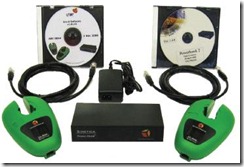
I received a CL-AMP IT package from the Noble Vision Group to review and give them some feedback on their kit.   The first thing that struck me was that this kit seemed to essentially be a power metering for dummies kit.    There were a couple of really neat characteristics out of the box that took many of the arguments I usually hear right off the table.
nvg

First the “clamp” itself in non-intrusive, non-invasive way to get accurate power metering and results.   This means contrary to other solutions I did not have to unplug existing servers and gear to be able to get readings from my gear or try and install this device inline.  I simply Clamped the power coming into the rack (or a server) and POOF! I had power information. It was amazingly simple. Next up -  I had heard that clamp like devices were not as accurate before so I did some initial tests using an older IP Addressable power strip which allowed me to get power readings for my gear.   I then used the CL-AMP device to compare and they were consistently within +/- 2% with each other.  As far as accuracy, I am calling it a draw because to be honest its a garage based data center and I am not really sure how accurate my old power strips are.   Regardless the CL-AMPS allowed me a very easy way to get my power readings easily without disrupting the network.  Additionally, its mobile so if I wanted to I could move it around you can.  This is important for those that might be budget challenged as the price point for this kit would be incredibly cheaper than a full blown Branch Circuit solution.

For monitoring individual IT equipment you can use a power monitoring strip like Raritan’s.  Here is an 8 port device.

Dominion PX CR8-15

Raritan's Dominion® PX Intelligent Remote Power Management Solutions help IT administrators improve uptime and staff productivity, save money and improve utilization of power resources.

With the Dominion PX:

  • Emergencies can be resolved with remote serial and TCP/IP access to outlet-level switching, improving MTTR.
  • Capacity planning is simplified with unit-level and outlet-level power utilization information.
  • Staff can gather detailed power information to improve uptime and productivity.
  • Travel costs and time can be saved with remote power cycling and monitoring.

Information provided by the Dominion PX — displayed at the strip via an LED display, and remotely through a Web browser — can be used to improve capacity planning through power consumption information for both the PDU and individual receptacle. Precise, outlet-level access and control allows users to reboot attached devices.

There are many choices out there, and the above two will get you started on your search.

Use a viral strategy

I was talking about viral strategy and a person said I don’t get it.  “What is viral?”  Here is a good explanation of a viral ideas.

What makes an idea viral?

For an idea to spread, it needs to be sent and received.

No one "sends" an idea unless:
a. they understand it
b. they want it to spread
c. they believe that spreading it will enhance their power (reputation, income, friendships) or their peace of mind
d. the effort necessary to send the idea is less than the benefits

No one "gets" an idea unless:
a. the first impression demands further investigation
b. they already understand the foundation ideas necessary to get the new idea
c. they trust or respect the sender enough to invest the time

This explains why online ideas spread so fast but why they're often shallow. Nietzsche is hard to understand and risky to spread, so it moves slowly among people willing to invest the time. Numa Numa, on the other hand, spread like a toxic waste spill because it was so transparent, reasonably funny and easy to share.

Buy some of these tools and give them to some of the people who want to measure energy consumption.  Tell them if they know of someone else that can use the tools, they can request an additional equipment deployment.  The one request you have is to get a report on what they discover is the energy consumption of their devices.

As you discover useful information start to share the information. You will discover some interesting data.

What are you after?  A cultural shift where people regularly talk of the kilowatts used by systems. Where these is waste, and where there are efficiencies.

Keep in mind there is a viral aspect of the ideas. I wrote an article for Microsoft’s TechNet magazine last year.  Look at the below figure.  There was network switch that consumed 100 watts when powered off vs 350 watts when on.  This an example of something that would get people’s attention.

Figure 4 Power-consumption comparison of on versus off

You are driving for the same behavior change as those who drive a Prius with instant MPG of the car and how the hybrid system is running.

Formalizing the power monitoring and data collection

After you get some momentum you want to start to bring some structure in power monitoring data collection.  Here are some areas I would suggest next.

  1. What is the actual power consumption of the device at idle, off, under load, peak, and expected loads?
  2. What are the expected power changes in a minimum, maximum configuration vs. planned?
  3. Can any of the components be upgraded to energy efficiency?  Hard drives, power supplies, or processors?
  4. Is energy savings turned on in the server BIOS and/or OS?  How much do you save with power management turned on vs. off?
  5. Are there alternative designs that can be tested?
  6. The biggest waste is over-provisioning. Do devices have to be as powerful as originally specified?  Keep in mind, this saves money as well as power.

Hope this help you think about how to change people’s behavior to ask “what is the power consumption?” whenever they talk about data center equipment.

BTW, this time of the year, I can enjoy looking at the lake, but we don’t go out on the lake as the dock is under water. Having come from a desert (Las Vegas) I find it nice to return to a  water environment.

In Chinese Taoist thought, water is representative of intelligence and wisdom, flexibility, softness and pliancy

image

Read more

eBay Distinguished Architect understands impact data centers – location, monitoring, power

Was reading James Hamilton’s blog, and was curious to see if the enterprise architects are discussing data center issues, and I found one in eBay Distinguished Architect Randy Shoup’s presentation.

Lesson 7 – data center location

image

Lesson 9 – Monitor everything

image

And, the most surprising was in Lesson 10 – power (!)

image

Now few in audience probably caught these three impacts on data centers, but it is a good sign that enterprise architects think it is worthwhile to add these points to their presentations.

Read more