Currently 70% of Dell’s Enterprise Hardware is ready for running @ 113 F

I had the pleasure of chatting with a group of Dell and Intel employees on Dell’s leadership move to support “chiller-less” data centers with Fresh Air Cooling.  The people I spoke to were.

· Rich Percaccio – Enterprise Marketing Manager, Dell Global Commercial Channel

· Eric Wilcox – Power and Cooling Portfolio Manager, Dell Product Marketing

· Dave Moss – Engineering Strategist, Dell Data Center Cooling Infrastructure

· Jay Kyathsandra – Marketing Manager, Intel Datacenter and Connected Systems Group

After listening a bit to the discussion what came to mind is the problem of storage or network gear that can support these conditions.

To meet the needs of a broader range of companies interested in employing more efficient and economical facility designs, Dell has validated a portfolio of servers, storage, networking, and power infrastructure that deliver short-term, excursion-based operation with limited impact on performance across a larger environmental window. In line with the new, more stringent ASHRAE A3 and A4 classifications, Dell systems have been developed for sustained operation at temperature ranges from minus 23 F (5 C) to 113 F (45 C) and allowable humidity from 5 percent to 90 percent. This level of design robustness has been validated by recent tests indicating that the products can tolerate up to 900 hours of 104 F (40 C) operation per year and up to 90 hours at 113 F (45 C)

So I asked what % of Dell’s product line can currently run at 113 F?  The answer 70%.  Which is a good number, and we can expect that within 6 months it will rise another 5 – 10%.  But, what about the rest of the industry?

What I admire Dell for is they took a risk to be in a leadership position.  And, now the rest of the IT hardware vendors are in a defensive position.

What is also brilliant is Dell can change the TCO conversation as Fresh Air Technology can save a company money.

This can result in more than $100K of operational savings per megawatt (MW) of IT and eliminate capital expenditures of approximately $3M per MW of IT[2]. In addition, IT systems that can tolerate higher temperatures can reduce the risk of IT failures during facility cooling outages


Less Code, Less Energy, Less Money, a path to managing IT for a Greener Data Center: ManageEngine

I had a chance to chat with Raj Sabhlok, President of Zoho Corp regarding the ManageEngine product.

image

Part of Zoho Corp’s intellectual property is WebNMS and is the founding company of Zoho in 1996.

image

What became clear as to why Zoho can do 90% of the features with 10% of the price is the company takes a different approach than many other management tools.  A greener approach.  How?  They write less code with as much as possible management monitoring done agentless.  Less agents mean less code to run on the servers which uses less energy.  Which also supports their lower price point.

If you are looking for a management software company that is greener, it is worth considering that you want a solution with as much agentless monitoring.  Raj says they can run 90% of their monitoring agentless.

This approach reminds me of JouleX which is started by a bunch of people who had networking expertise.

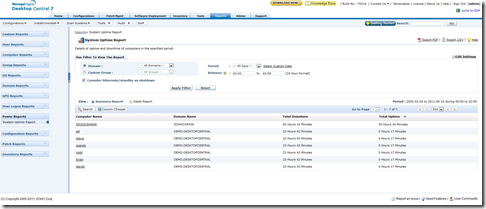
Here is a ManageEngine Dashboard for measusring the Desktop use which then corresponds to the amount of time on vs. off.

image

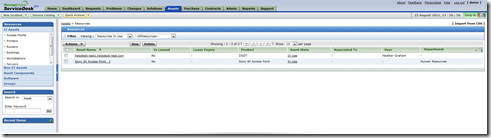
and here is a screen shot for asset management.

image

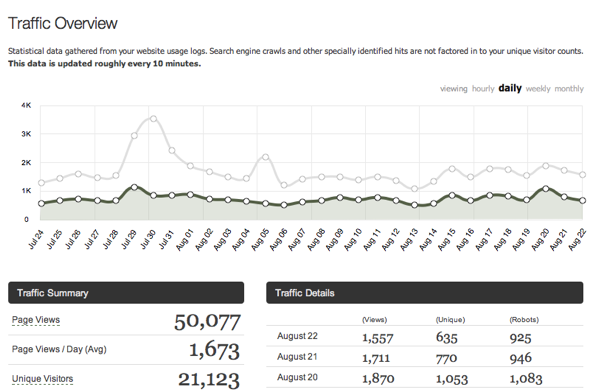
50,000 Page Views in last 30 days

I was watching the traffic on this blog and if I count over the past 30 days, not a calendar month (july, aug, etc) I just hit 50,000 views.

NewImage

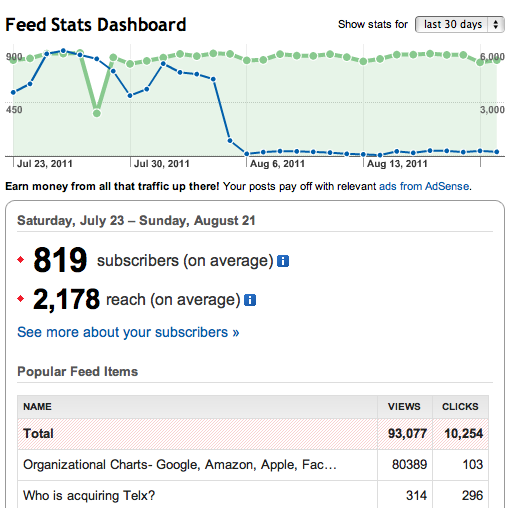
The feedburner metrics are another 13,000 or so views, but for the last 30 days the metrics are skewed based on my post on the org charts of Google, Facebook, Oracle, Apple, Amazon and Microsoft.

NewImage

Thanks for continuing to visit this blog.

-Dave Ohara

Facebook's Open Compute discusses HDD Power Savings

Facebook's Open Compute Project has a post by Eran Tal on HDD Power Savings.

SAVING DATA CENTER POWER BY REDUCING HDD SPIN SPEED

THURSDAY, AUGUST 18, 2011 | Posted by  at 20:40 PM

Many data centers sit on a lot of “cold storage” — servers containing terabytes of user data that must be retained but is rarely accessed, because users no longer need that data. While the servers are considered cold because they are rarely utilized, their hard drives are usually spinning at full speed although they are not serving data. The drives must keep rotating in case a user request actually requires retrieving data from disk, as spinning up a disk from sleep can take up to 30 seconds. In RAID configurations this time can be even longer if the HDDs in the RAID volume are staggered in their spin up to protect the power supply. Obviously, these latencies would translate into unacceptable wait times for a user who wishes to view a standard resolution photo or a spreadsheet.

Reducing HDD RPM by half would save roughly 3-5W per HDD. Data centers today can have up to tens and even hundreds of thousands of cold drives, so the power savings impact at the data center level can be quite significant, on the order of hundreds of kilowatts, maybe even a megawatt. The reduced HDD bandwidth due to lower RPM would likely still be more than sufficient for most cold use cases, as a data rate of several (perhaps several dozen) MBs should still be possible. In most cases a user is requesting less than a few MBs of data, meaning that they will likely not notice the added service time for their request due to the reduced speed HDDs. What is critical is that the latency response time of the HDD isn’t higher than 100 ms in order to not degrade the user experience.

One of comment responses is from a Western Digital employee.

Brandon SmithAug 20

I work at Western Digital, the largest disk drive producer in the world on motor control, and this is already being implemented. I am not sure how many drives this has already been shipped with, but we definitely have low RPM standby modes. I believe it might take a few hundred ms to get back up to speed and load the heads to get to the data, so if the latency requirement is less than 100 ms, I am not sure this strategy is the way to go for data centers. Also, a spindle motor designed to spin at 7200 RPM will not spin efficiently or consistently at 3600 RPM. 4500 to 5000 RPM is a more realistic number.

For this type of storage, SSD's are not the answer, because they are not even close to cost competitive. HDD's are the way to go, but we need to be realistic about the time it will take to access the data if we want to save energy.

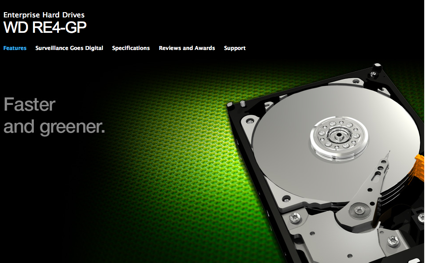
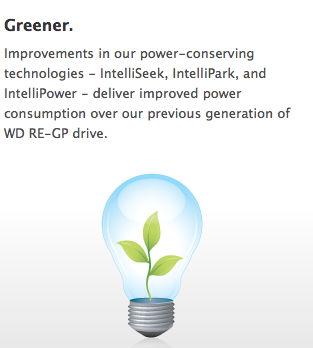
So what Green Technologies does WDC?

NewImage

NewImage


IntelliSeek.
Calculates optimum seek speeds to lower unnecessary power consumption, noise, and vibration. View demo
IntelliPower.
A fine-tuned balance of spin speed, transfer rate, and caching algorithms designed to deliver both significant power savings and solid performance. Additionally, drives with WD GreenPower Technology consume less current during start up allowing more drives to spin up simultaneously resulting in faster system readiness.
IntelliPark.
Delivers lower power consumption by automatically unloading recording heads during idle to reduce aerodynamic drag, and by disengaging read/write channel electronics.
Active Power Management.
Drives with WD GreenPower Technology monitor the work load and automatically invoke idle mode whenever possible to further reduce unnecessary power consumption. Drive recovery time from idle mode is less than one second, providing seamless power management between the drive and the host controller.
Ideal for:
Large data centers, web service providers, commercial grade surveillance systems and organizations requiring huge amounts of storage with limited budget and power allotment.


Think your boss is killing you, guess what, your co-workers affect you more

I usually spend over a year getting to know people before I start a project with them.  Why so cautious?  I've learned life is too short to spend time working with people who you don't enjoy spending time and trust.  It is hard to be creative when your co-workers are looking out for their own interests and don't have your back.  One of the best guys to work with was my departed friend Olivier Sanche, and I wrote about the concept of a wingman watching your back.

Data Center Wingman, who has your back? One of the best Olivier Sanche

Olivier and I spent a lot of time together and one of the ways you could describe our relationship is we were wingman for each other.

A common assumption is a bad boss can be bad for your health, but what about your co-workers.  WSJ has an article that discusses how your co-workers can affect your health.

Your Co-Workers Might Be Killing You

Hours don't affect health much—but unsupportive colleagues do

...

Instead, the Israeli scientists found that the factor most closely linked to health was the support of co-workers: Less-kind colleagues were associated with a higher risk of dying. While this correlation might not be surprising, the magnitude of the effect is unsettling. According to the data, middle-age workers with little or no "peer social support" in the workplace were 2.4 times more likely to die during the study.

But, you know what can be worse than your co-workers.  How about the computer system that treats the individual as a cog.

But that wasn't the only noteworthy finding. The researchers also complicated longstanding ideas about the relationship between the amount of control experienced by employees and their long-term health. Numerous studies have found that the worst kind of workplace stress occurs when people have little say over their day. These employees can't choose their own projects or even decide which tasks to focus on first. Instead, they must always follow the orders of someone else. They feel like tiny cogs in a vast corporate machine.

The things that you may think affect your health long hours and the boss were not shown to worsen your health.

The first thing the researchers discovered is that a lot of the variables they assumed would matter had no measurable impact. The number of hours a person spent at the office didn't affect his or her longevity, nor did the niceness of the boss.