Why Dell made a smart move with its ARM Servers, providing a Hosting Service

I've been blogging about ARM in servers for quite a while and have had many conversations with people who think there is a market for little green servers.

Dell announced its ARM Server last week.  The one part that I kept on focusing on is the way Dell is delivering, well not delivering the ARM Servers.

Enabling other customers and developers by providing remote-accessible Copper ARM server clusters deployed in Dell Solution Centers, and through our deep partnership with the Texas Advanced Computing Center (TACC). These clusters will be in place by the end of the year.

Not only does this provide a low cost way to increase the availability of Dell ARM servers, it provides data to Dell on what customers are doing.

A handful of people are getting ARM servers, and I am sure we won't hear anything from these uses for quite a while.  But, it is a safe bet there is an overlap with the Seamicro customer base.

  • Shipping the new Dell “Copper” ARM server through a seed unit program to a select list of customers worldwide. There is no general availability at this time.
  • Delivering Copper seed units to key ecosystem partners to support their development activities.

Here is a video to watch on the server.

The Dell ARM web site is here for more info.

Dell drives innovation for the ARM server ecosystem

Enterprises that run large web, cloud and big data environments are constantly seeking new technology to gain competitive advantage and reduce operations cost. This focus is motivating a dramatic interest in ARM-based server technologies as a way to meet these requirements.

What is ARM?

An advanced RISC machine (ARM) server employs small, low-power ARM processors, typically deployed as systems on a chip (SoC) to reduce space, power consumption and cost. ARM processors are present in billions of client devices, but they have not been previously adopted for use in servers, due to the feature set, performance and limited software ecosystem. 

Moving ARM to the forefront

Now that the processors have grown in capability, and the basic open source software is available, both customers and developers are anxious to test ARM servers to confirm the potential benefits within real-world environments. In response to customer demand, Dell has decided to enable the Dell “Copper” ARM-based server ecosystems, by:

  • Shipping Dell "Copper" ARM servers to a select list of customers and partners, as part of a worldwide seed program. Systems have already begun shipping, but there is no general availability of the Dell "Copper" servers at this time.
  • Enabling developers worldwide through remote-accessible Dell "Copper" ARM server clusters, in Dell Solution Centers and through our close partnership with the Texas Advanced Computing Center (TACC – UT).
  • Delivering Dell ARM-supported solutions to the open source community, such as Crowbar on ARM and Crowbar for Hadoopon ARM.
   

Project Copper chassis and sled

  Dell "Copper" ARM server chassis and sleds
   

Project Copper server sled


Dell "Copper" ARM server sled

Netflix open sources its HW and SW CDN Solution

Open Compute has started the open sourcing of servers and data centers.  Storage is another big area, and Netflix has shared its design.

The home page is here.

Netflix Open Connect Content Delivery Network

Around the world, people are enjoying nearly a billion hours per month of movies and TV shows from Netflix. Now, Netflix is enabling ISPs to get Netflix video data directly from Open Connect, a single-purpose content delivery network we've established.

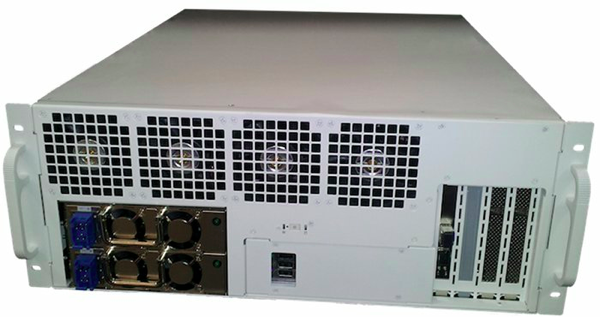
Most of you want to see the HW.

Objectives

When designing the Open Connect Appliance Hardware, we focused on these fundamental design goals:

  • Very high storage density without sacrificing space and power efficiency. Our target was fitting 100 terabytes into a 4u chassis that is less than 2' deep.
  • High throughput: 10 Gbps throughput via an optical network connection.
  • Very low field maintenance: the appliance must tolerate a variety of hardware failures including hard drives, network optics, and power supply units.
  • Simple racking and installation. Front mounted power and network ports are the only things to connect at install time.
  • NewImage

 Here is the BOM for the HW.


Bill of Materials


DescriptionVendor & ModelQuantity
Chassis TST custom 1
Motherboard Supermicro X9SCM-F 1
Processor Intel E3-1260L 1
Memory 8GB ECC 1333MHz 4
Hard Drive Hitachi Deskstar 5K3000 3TB 36
Hard Drive (alternate) Seagate Barracuda 7200.14 3TB 36
Controller LSI SAS 9201-16i 16 port 2
Network card Supermicro AOC-STGN-i2S 1
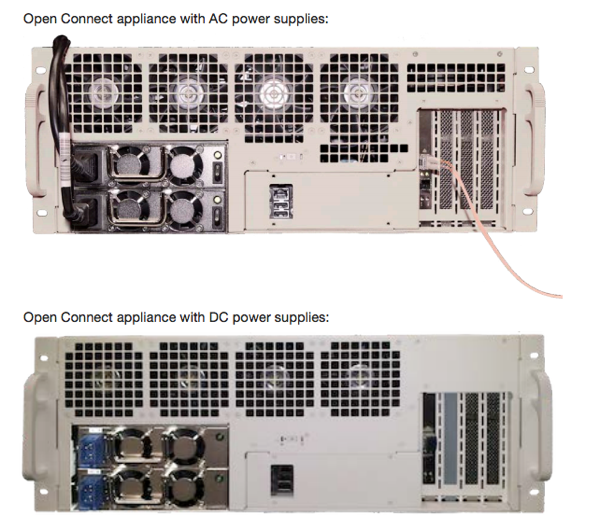
Redundant Power Supply Unit (AC/DC options) Zippy MRW-5600V4V/DMRW-5600V4V 1
Misc. 2U active CPU Heatsink, SATA Cables, NIC optics

Then design has AC and DC power supplies.

NewImage

There is 1 TB of flash.

We also add 1 TB of flash storage (2 solid state drives) for system files, logs and popular content.

You can get more details on the site.

Open Connect

Change Your LinkedIn Password, 6.5 million leaked, 576 news articles

I've changed my LinkedIn password.  Have you?

There are 576 news articles on the leak.

6.5 million LinkedIn passwords reportedly leaked online


CNET - 6 hours ago
A hacker says he's posted 6.5 million LinkedIn passwords on the Web -- hot on the heels of security researchers' warnings about privacy issues ...
Highly Cited: Millions of LinkedIn passwords reportedly leaked - take action NOW‎ Ars Technica
Blog: 6.5M LinkedIn Passwords Posted Online After Apparent Hack‎ PCWorld (blog)
LinkedIn investigating reports of stolen passwords‎ The Associated Press
All Things Digital Computerworld (blog) 
all 576 news articles »

I received this e-mail through LinkedIn which was suspicious.

LinkedIn

xxxxxx has sent you a message.

Date: 6/04/2012

Subject: How are you?

Dave,

It is good see that you are in a new adventure and I am sure you will do well. Can you say what you are doing? I hope they know they have a quality person like you! All the best to you and your family.

Understanding Data Center Types - Cloud, Hosted, Colocation, Wholesale, Owned

I was having a conversation with a client and it occured that most company executives probably don't understand the different data center types that exist.  It seemed worthwhile to describe the different data center types that exist and how executives should understand the differences.  They hear terms like cloud, hosted, colo, and wholesale all the time, but what does this mean?

Besides doing a few searches, I reached out to Jones Lang Lasalle's Michael Siteman to see what he had on data center types. It was quite thorough.  I needed something simpler.  Something a non-data center executive could understand in one ppt slide.  

I am sure this seems obvious to most of you, but trying to get this into one slide was a good exercise.

Here is my current thinking a slide.

NewImage

The text is here.

•Cloud (VM) – bring your code and data - OS, Server, Network, Storage available for lease; on-site operations and IT services all done by cloud provider

•Hosted (Servers) – Physical servers are unit of delivery within IT environment design – HW for lease

–Similar to an internal IT service group for small scale

–Cloud Hybrids are more common

•Colocation (Racks) – bring your IT equipment, pick your ISP, provide power, space, facility operations

–Lease space and power capacity – for example 10 racks @ 10KW/rack

•Wholesale (MW of capacity) – you rent space, power, cooling and an open floor plan; you decide the layout of your space – power, cooling, network

–Need facility operations as well as IT Operations for your space

–Lease 10,000 sq ft @ 1MW

•Owned DC (everything) – you have everything under your control

–Big things gained vs. the previous steps you pick the site, you pick the design best meets your business needs, and the whole facility is yours

–Problem: if you haven’t built a lot of DC, then you will make mistakes

–2MW plus, the big big guys Google, Facebook, Amazon and Microsoft are building 10 – 30MW

 
I think this works pretty well.  Technical enough with details like power consumption, yet high level to convey the differences.